 StatHawk
Schedule the game ahead of time, set it up when you get to the field, then score each play as it happens. Your box score and season stats fill in as you go.
Steps
- Open your team’s Schedule tab and choose +. Pick the opponent, date and time, then choose Save Event.
- At the field, open the game and choose Game Setup. Pick who gets the ball first and which end zone that team attacks, then choose Start Game.
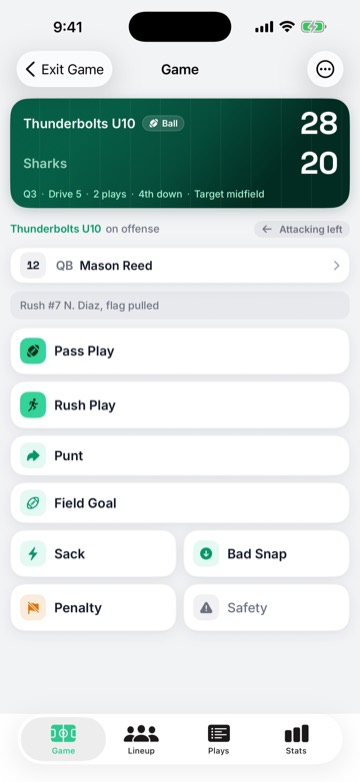
- Score each play with Pass Play or Rush Play: pick the player, then what happened. Sack, Bad Snap, Penalty and Safety have their own buttons. Punt and Field Goal show when your rules allow them.
- After a touchdown, StatHawk asks about the try. Choose the try, then pass or rush, then Good or No Good.
- When the game is over, choose ⋯ › End Game, check the score, then choose Finalize Game.
Start with signal
Starting a game needs a connection. After that, plays save on your phone even with no signal.
Want to practice first?
Before you sign in, Explore Scorekeeping on the welcome screen opens a practice game with a sample roster. Nothing from it is saved.
Did you find this helpful?